How to host an online auction
Create a room for your item, send the link to your bidders, and start when everyone has joined. Going Going handles the bids and the result. You arrange payment and collection with the buyer.
Create an auctionSet up the item
Give the auction a title your group will recognize. Choose the format and set its price and timing. You can preview each format in setup or use “Help me choose” if you’re unsure.
For a familiar bidding contest, an English auction lets everyone see and raise the current bid. For private offers, first-price sealed bidding collects bids without showing the competition.
Invite your bidders
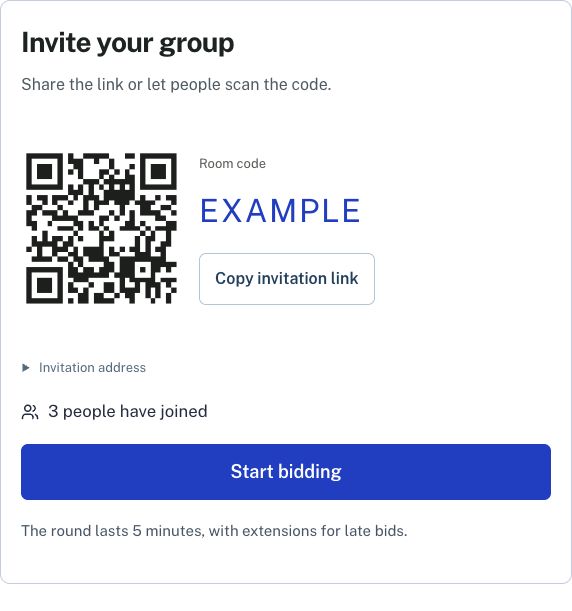
Copy the room link into your group chat, or show the QR code if you’re together. People open it on their own phones and join with a name. Nobody needs an account.
You’ll see who has joined. When the group is ready, press Start bidding. Keep your host page open so you can follow the auction.
Follow the bidding
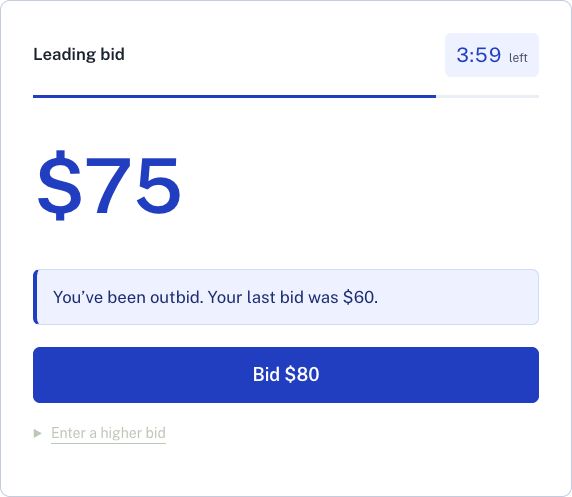
Each bidder gets the controls for the format you chose. In an English auction, the current price and the next bid are prominent. Bidders can see when they’re leading or have been outbid.
The room closes automatically. English auctions give everyone at least 30 seconds to respond to a late bid, so the finish can extend beyond the original timer.
Complete the sale
The result identifies the winner and what they owe. The payment rule depends on the format: in a second-price auction, for example, the winner may pay less than their own bid.
Contact the winner to arrange payment and delivery or collection. Going Going does not take payments. Save the result if you need it later: room access expires 24 hours after creation.
What you can host
Rooms are free and hold up to 40 bidders, with one item per auction. They’re made for short sessions with people you invite, rather than a public marketplace or a catalog of items running for days.
You can choose from all the auction formats on the site. If you’re comparing private-bid formats, read first-price vs. second-price auctions.